
Tool guide
Borrowing Trainer
Basic questions are public. Free adds core practice; Pro adds advanced exercise settings.
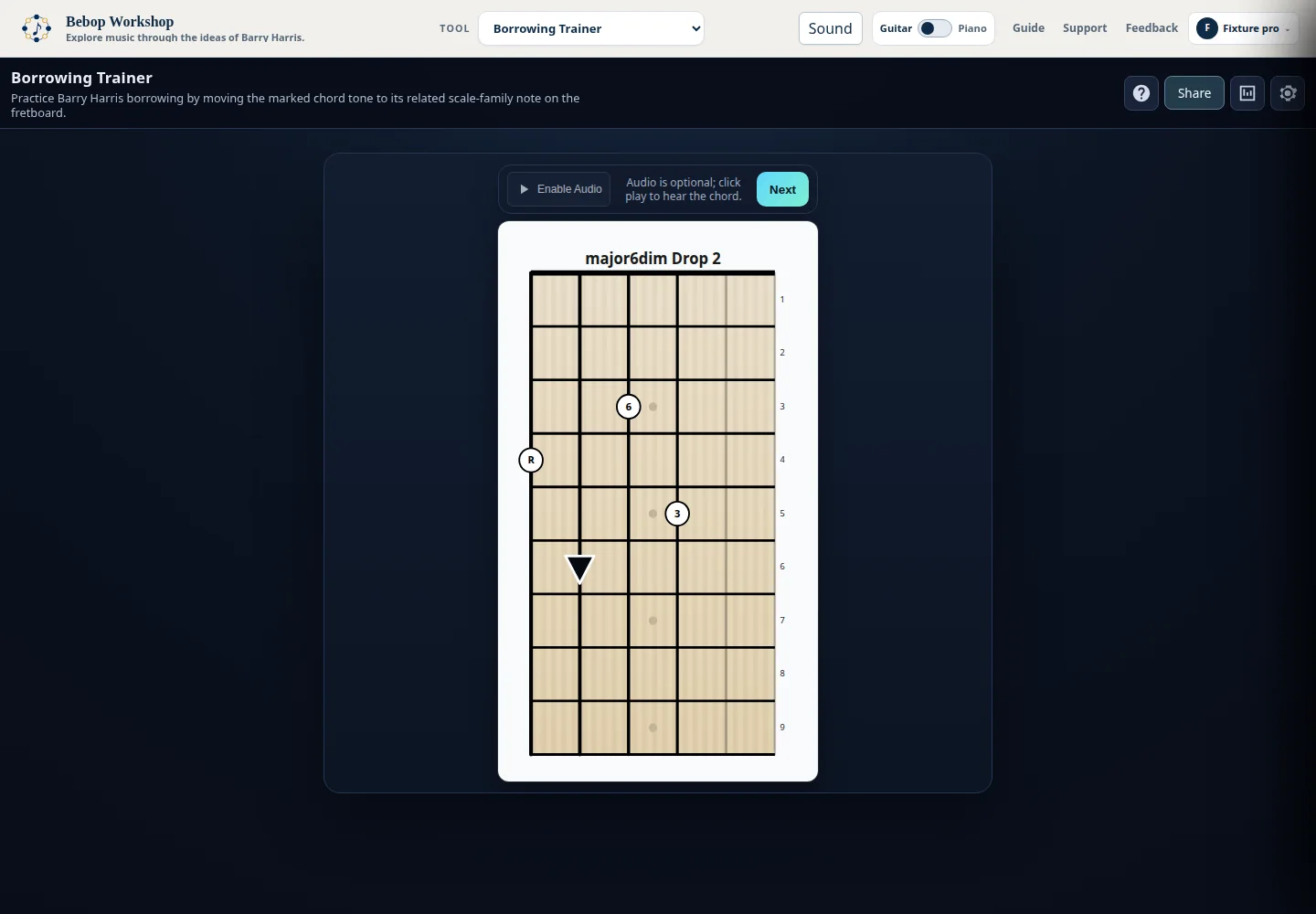
Borrowing Trainer presents a chord tone and asks you to find its related borrowed note above or below within the same Barry Harris scale family. Follow the direction marker on guitar or piano, then check your accuracy by scale, voicing, and direction.
Start a borrowing question
Each question displays a full chord voicing with one chord tone marked by a triangle. The requested destination is a related scale-family note in the direction shown.
- Choose Guitar or Piano in Settings.
- Read the instruction and find the triangle on the active instrument.
- Follow the triangle to the lower or higher destination note.
- Click the destination fret or piano key.
- Use Next to skip the question and generate another one.
- The completion animation and short audio example appear after a correct answer when audio is available.
- Wrong choices flash as feedback and do not change the question's direction.
Read the direction marker
The triangle points toward the answer. On the fretboard, the lower direction means a lower fret and lower note; the higher direction means a higher fret and higher note. On the piano, lower is to the left and higher is to the right.
- For example, borrowing from E up to F points down the fretboard or right on the piano.
- The current instrument changes the visual layout, but the borrowing direction keeps the same musical meaning.
- Expert mode removes interval labels, leaving the destination to be identified from the display, ear, and theory knowledge.
Set the practice pool
Settings controls the direction, labels, scale families, voicing types, and string-set or source-layout combinations used for new questions. Available scale labels are Major 6 Diminished, Minor 6 Diminished, Dominant 7 Diminished, and Dominant 7 b5 Diminished.
- Borrowing Direction can be Above only, Below only, or Random (above/below).
- Expert mode hides interval labels; Thirds voicings always show labels according to the in-app help.
- Voicing choices include Drop 2, Drop 3, Drop 2+4, Triads, Thirds, Low Shell, and High Shell when available.
- Volume ranges from 0 to 100 percent in the panel. Save applies the selection, and closing Settings also saves it.
Use the display and sound
Guitar mode shows the active string set on a fretboard. Piano mode shows the corresponding source layout on a keyboard. The voicing display identifies the scale and voicing family used by the question.
- Click the play control once to initialize audio if the browser requires a user gesture.
- Use the play control to hear the current chord before answering when audio is ready.
- After a correct answer, listen to the chord with the borrowed note when the sound system is initialized.
- Audio is optional and does not prevent visual practice.
- If audio cannot initialize, the status text reports the problem and you can keep working on the display.
Read and reset statistics
The Statistics panel stores completed-question results in this browser and updates after each completed question.
- Overall results show total questions, correct and incorrect counts, and accuracy.
- Results are grouped by scale and voicing type.
- The detailed view combines voicing type, string set or source layout, and borrowing direction.
- Reset All Stats clears these locally stored results.
Saved choices and access
Your personal settings and statistics are saved in this browser. If your access changes, the trainer keeps your saved choices and uses the choices currently available to you until the others return.
- Basic practice is available without signing in. Some core combinations require sign-in, and advanced settings may require Pro access.
- The tool labels choices with [FREE] or [PRO] when those labels apply.
- A saved choice that is temporarily unavailable remains retained, while available volume and presentation controls continue to work.
Troubleshooting
If the instruction cannot be generated, open Settings and enable at least one scale and one voicing/string-set combination. A borrowing direction can also be constrained by the available source layout.
- If you cannot hear audio, click Play, check browser volume, and try again. Continue visually if sound remains unavailable.
- If the marker seems to point the wrong way, check the instrument selector: fretboard directions are described by fret and pitch, while piano directions are described left and right.
- If a choice is unavailable, the current question is preserved. Follow the sign-in or upgrade prompt, or reset to the starter Major 6 Diminished / Drop 2 exercise.