
Tool guide
Interval Trainer
Basic questions are public. Free adds core practice; Pro adds advanced exercise settings.
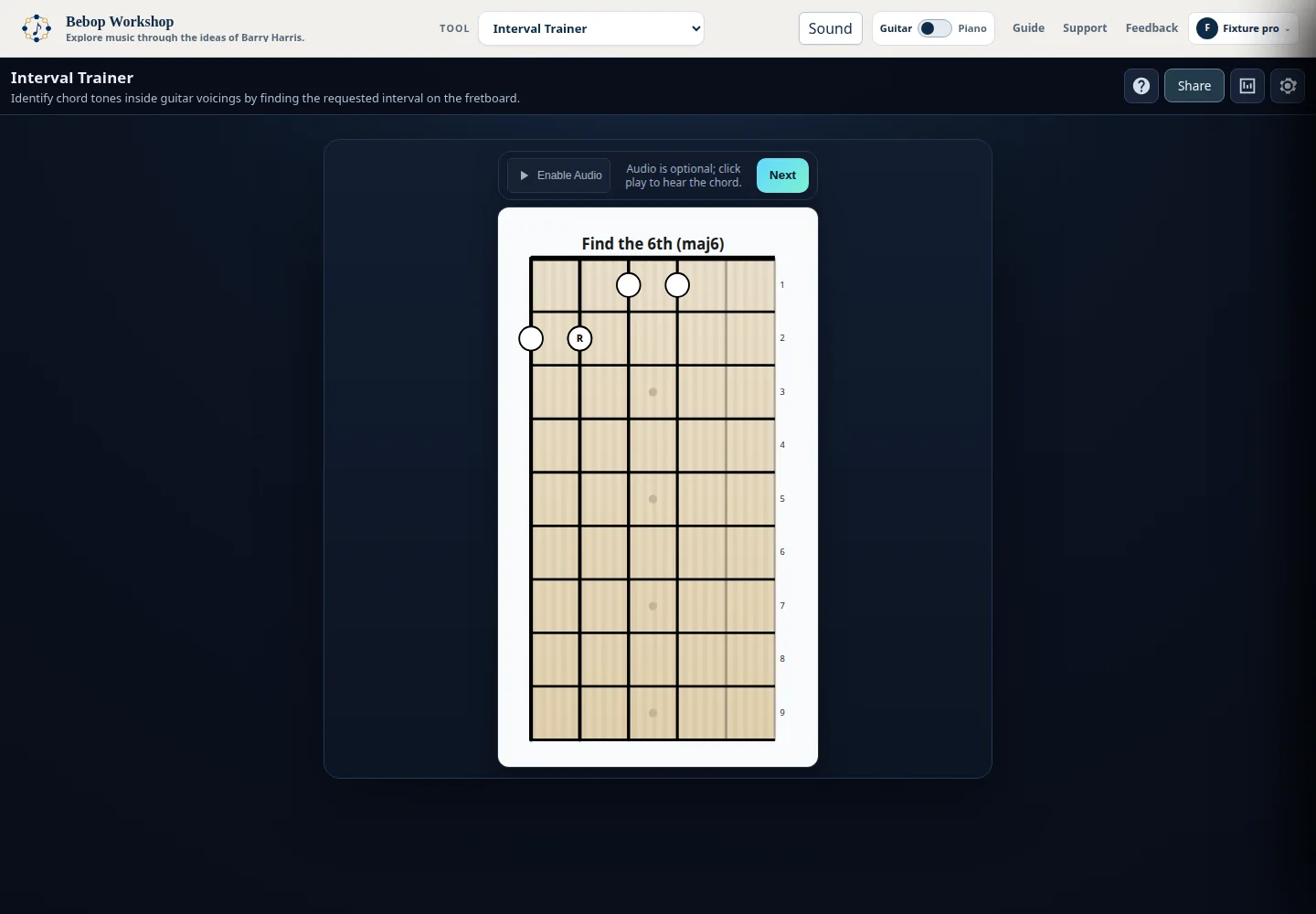
Interval Trainer asks you to locate a chord-tone interval inside a displayed scale-of-chords voicing. It is a locating and labeling exercise on guitar or piano, distinct from an ear-only interval quiz.
Start an interval question
The instruction names the target, such as Root, b3, 3rd, 5th, b5, 6th, or b7. Active notes of the voicing are marked on the selected instrument.
- Choose Guitar or Piano in Settings.
- Read the instruction heading for the requested interval.
- Locate the marked chord tone that matches the request.
- Click its fret or piano key.
- Use Next to skip the current question.
- A wrong choice flashes feedback and remains part of the current attempt.
- A correct completion reveals the voicing feedback, plays the chord when audio is ready, and advances after a short pause.
What this trainer tests
Interval Trainer asks you to locate chord-tone relationships inside a displayed voicing. The fretboard or keyboard gives you the physical positions; the instruction gives you the target interval.
- The interval filters group targets as Root, 3 and b3, 5 and b5, or 6 and b7.
- The trainer is different from Ear Training: this task is identifying a named chord tone in a visible voicing, with optional sound support.
- Hints can label another active note so you can orient yourself before choosing the target.
Configure hints and targets
Settings controls hint behavior, allowed interval groups, scale families, voicing types, source layouts or string sets, and volume.
- Hint mode can be None, Random, Lowest Note, Highest Note, or an interval group such as Root, 3 and b3, 5 and b5, or 6 and b7.
- If an interval-group hint is selected, leave another interval group enabled so the trainer has a target to quiz.
- Use the interval checkboxes to focus on selected groups; the default enables all four groups.
- Scale labels are Major 6 Diminished, Minor 6 Diminished, Dominant 7 Diminished, and Dominant 7 b5 Diminished.
- Voicing choices include Drop 2, Drop 3, Drop 2+4, Triads, Thirds, Low Shell, and High Shell when available.
- Volume ranges from 0 to 100 percent in the panel. Save applies the selection, and closing Settings also saves it.
Use guitar, piano, and audio
Guitar mode displays the active strings and fret positions. Piano mode displays the source voices in the keyboard range. Note labels show interval roles after the app has enough information to reveal them.
- Click the play control from a user gesture to initialize audio when required by the browser.
- Use Play to hear the current chord while orienting yourself.
- After a correct answer, the trainer plays the chord when audio is initialized and shows completion feedback.
- Audio is optional; the task can be completed from the visual display.
- If sound is unavailable, the status message reports it and visual feedback remains available.
Review and reset statistics
Statistics are stored in this browser and count completed questions. The panel separates overall results from the settings dimensions that produced each question.
- Overall results include total questions, correct and incorrect counts, and accuracy.
- Breakdowns are available by scale, voicing type, and voicing type plus string set or source layout.
- The detailed view also groups results by voicing type and interval group.
- Only a completion with zero wrong clicks is recorded as correct.
- Reset All Stats clears the interval trainer results stored in this browser.
Saved choices and access
Your personal settings and statistics are saved in this browser. If your access changes, the trainer keeps your saved choices and uses the choices currently available to you until the others return.
- Basic practice is available without signing in. Some core combinations require sign-in, and advanced settings may require Pro access.
- The tool labels choices with [FREE] or [PRO] when those labels apply.
- Changing an allowed setting does not delete choices that are temporarily unavailable; they remain saved for later.
Troubleshooting
If a question cannot be generated, open Settings and keep at least one scale, one interval group, and one voicing/string-set combination enabled. A hint mode that names an interval group also requires another group to remain available as a target.
- If the requested target is unclear, read the instruction heading rather than relying on a hint label; the hint marks another active note.
- If you cannot hear sound, initialize audio with Play, check browser volume, and continue visually if needed.
- If a choice is marked [PRO] or unavailable, the current question is preserved. Follow the sign-in or upgrade prompt, or reset to the starter Major 6 Diminished / Drop 2 exercise.