
Tool guide
Scale Outlines
Basic outlines are public. Free adds transposition; Pro adds the full library and authoring.
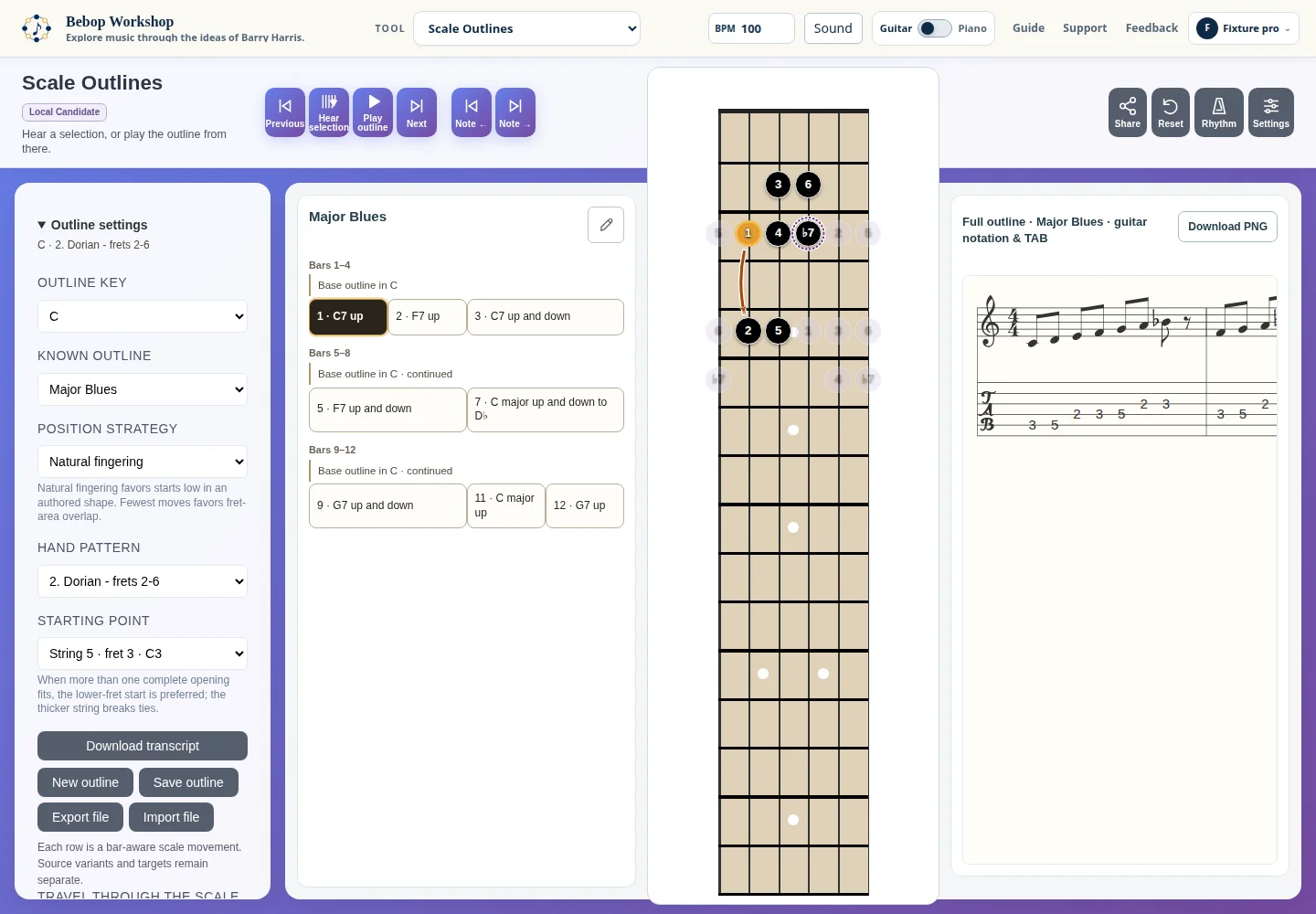
Scale Outlines presents complete bar-based scale forms with a selectable source variant, movement map, synchronized notation, guitar or piano display, and playback. Supplied outlines can be inspected and transposed; authoring controls appear according to account access.
Load an outline
Open Outline settings and choose Outline key, Known Outline, and Source Variant. Position Strategy chooses between Natural fingering and Fewest position moves; Hand Pattern then displays the chosen guitar position.
Some outlines expose Starting Point when more than one complete opening fits. The outline map shows sections, bars, and movements, while the phrase card shows the current movement and notation.
The supplied library and its variant labels are shown in the outline picker. A local outline is labeled as a personal outline or draft when it is created or saved in this browser.
- Choose an entry in Known Outline.
- Select a Source Variant when the entry offers alternatives.
- Set Outline key and Position Strategy, then choose a Hand Pattern or Starting Point if those controls are shown.
Read the outline on guitar or piano
Open Settings to choose Degrees or Note names, show the hand position or full parent scale where available, and combine the instrument overlays. The outline overlays include all cycle notes, Playing note, First note border, Last note of current step, an arrow for the next move, and Move numbers.
Display Type switches between Horizontal Fretboard, Vertical Fretboard, and Piano Mode. Guitar settings include a horizontal flip, fretboard size, fret count, fret numbers, and fret markers. Piano Mode can optionally keep the fretboard visible.
The current movement and full outline are rendered in notation, with guitar TAB when the score is available. The score heading states that written notation is one octave above sound; playback and TAB use the actual pitches.
Control sound and rhythm
Use Tempo in the top header to set BPM; Scale Outlines accepts values from 30 through 240. Open Sound or Rhythm for instrument, volume, click type, click volume, metronome, and count-in. Changing tempo or another sound setting stops active playback before the next run.
Hear selection plays the selected movement once. Play outline starts autoplay through the outline and changes to Stop while audio is active.
- Click Type choices include Ride Bell, Hi-hat, Stick Click, Kick Drum, and Woodblock.
- Count-in choices are None, 2 beats, and 4 beats.
- Playback follows the selected outline document and its current movement order.
Save, export, and share
Save outline stores a personal copy in browser local storage. Export file downloads the current document as a Scale Outlines JSON file; Import file reads a compatible JSON file. Download transcript creates a plain-text outline listing with section and bar locations. Download PNG saves the rendered score when notation is available.
Share creates a full setup URL and attempts to create a permanent short link. The link includes the outline document, entry and variant, position choice, outline controls, tempo, and the selected starting point needed to restore the same example.
Importing a shared link is session-only: it stops active playback, restores the same outline without automatic playback, and leaves the recipient's saved preferences unchanged. If short-link storage is unavailable, the full link remains available.
- Finish selecting or editing the outline.
- Use Save outline or Export file for a local copy, or Share for a setup link.
- Use Import file only with a Scale Outlines JSON file; the imported document is checked before it replaces the current outline.
Understand access levels
The public starter view provides supplied outlines and their basic presentation. A signed-in Free account can transpose the two supplied free entries, Major Blues and Blue Bossa. Pro access is required for the broader outline library, additional variants, and authoring controls.
The app marks gated controls with Free or Pro badges and preserves a working outline when an access check blocks an action. A shared outline can remain available for its fixed view and playback, but the shared link does not grant authoring, saving, importing, or other restricted account capabilities.
During the introductory preview, a Free account may also have Pro features. Your account menu shows whether the preview is active.
- Basic: supplied outline viewing and playback.
- Signed-in Free: transposition of the supplied Major Blues and Blue Bossa outlines.
- Pro: the broader library, variants, and outline authoring, local save, and import controls.
Troubleshoot an outline
If a key, outline, or variant change is blocked, the app keeps the previous selection and shows an access message. Use the supplied Major Blues action when you need to return to a basic outline, or use Restore shared outline when a shared example is being held for review.
If an outline does not fit the selected hand pattern, choose another Hand Pattern or Position Strategy. If an editing operation fails validation, close the dialog or correct the reported bar, section, or movement value; the previous document remains in place.
If a shared setup cannot be loaded, the app leaves the current setup unchanged and reports the validation or service error. A full setup URL can be used when a short link is unavailable. If sound does not start, wait for Loading instrument to finish, check Sound settings, and press Hear selection or Play outline again.